Hey all. I’ve recently swapped to Linux and I’ve been really enjoying it so far. I’m still pretty new to basically every aspect of it, though, so I’m not super sure what things I should be wary of with regard to hardware, in particular with Mint.
I was looking at buying a newer laptop to keep up with my main game, but it occurred to me that newer hardware may come with either a host of issues or be less supported than older hardware.
Any advice for laptops in this regard?
You can save buckets of money looking for used hardware. I got a crazy nice laptop from Craigslist for <$300.
If you can, bring a live USB stick with you and test it out before you purchase. Check peripherals like wifi, audio, camera, bluetooth, etc.
Make sure the ram is upgradable. A lot of them are soldered on these days and you’re stuck with that amount forever.
Latest Lenovo T series come with LPCAMM2 which should replace that soldered nightmare.
https://www.ifixit.com/News/115827/new-thinkpads-score-perfect-10-repairability
https://www.ifixit.com/News/95078/lpcamm2-memory-is-finally-here
you don’t have to use or like Ubuntu, but they do have a certified hardware list that might be helpful
Oh wow, that’s actually super helpful! Thanks!
I have a framework 13 running fedora and I absolutely love it. Upfront costs are expensive though - long term cost might be more reasonable (or even less) if I upgrade it for years/decades. Bit early to tell. But I do love it. Best laptop I’ve ever had (and I’ve had them all - even a thinkpad)
Wow, really? I was just looking at these and they are super interesting. You’re not wrong about that up front cost, though, yikes. What is it that makes them so seemingly modular? Is it proprietary stuff? Or is it just the focus of how it’s constructed? I’d be super leery about getting locked into ‘their ecosystem’ if they suddenly went under or something.
So I can actually comment on both the 13 and the 16 as I helped my family member build a 16. The 13 is my preference for a daily driver for school or for what I use it for - at work. The 16 is best “docked as a desktop, but I can take my powerhouse on the go”. The 16 is a bit bulky to carry around or use on a plane imo.
The 13 The chassis is great. Well built, sturdy, super easy to take apart with a single supplied screwdriver, captive bolts, no glue, etc. Really just a dream to work on. Swappable ports are awesome and they work great. Screen and trackpad are nice, not as nice as a MacBook, better than almost all others. Trackpad bracket is a little flimsy, but it’s replaceable. I’ve had zero other issues. As far as getting locked into their ecosystem. I’m not really worried about about that. Yes if they stop making main boards to fit the chassis, then the laptop gets stale, but the it’s a regular laptop…. All the components are standard thingies you can buy anywhere, ram, ssd, WiFi cards, etc. Battery is OK, I wish it lasted a bit longer. Like everything in the laptop, that’s easily replaceable too. I would say it’s about as future proof as you can get in a laptop.
The 16 The chassis is also great except for the little blank plates on the sides of the trackpad. They work fine, but from a fit and finish standpoint they are lacking. The 16 is otherwise a beautiful machine. Now the gpu- that I believe is subject to “being locked into the framework ecosystem”. Nobody will make a gpu in that form factor except framework. They did just release a 2nd card with a newer gpu in it. Hopefully that continues-so far so good. I both want a 16 and don’t. It’s kind of big. Just depends on what your use case is.
Both beautiful machines that are fantastic to use, and both are “laptops that are like desktops”. There’s other options probably, but I can only compare to thinkpads, Macs, hps, dells, surfaces, asus, and other random windows machines. Never seen a system76. Framework is my favorite, thinkpad is second.
I’d heard of Framework, Tuxedo, and system76, but not the others. Thanks for the pointers!
Also slimbook! They’re offering similar machines to tuxedo, but my Executive 14 13700 was slightly cheaper than the equivalent Tuxedo Infinity book pro (same clevo laptop base), and dropped the second nvme slot for a full 99Wh battery.
Additionally, I has no problems shipping from Spain to the US.
Oh you will suffer in the best way possible. You like the Slimbook now but in five years something will degrade, like the battery. You’ll think about getting a new one and you’ll look forward to it but nooo, you will not get a new one. You will look online and there will be parts available and you’ll repair it. Then you’ll need more disk space or ram so you’re hoping to get a new one but nooo, you will upgrade it. And then something will break and you finally see the part is not in stock so you mail them just in case but instead of an automated reply you’ll get a real response and they’ll get you the part you need. Sure, replacing a glued keyboard is a bit exciting but turns out a lot can be replaced. Not sure how old mine is but I like it, it just keeps running.
System76 is actively battling age verification.
Lenovo ThinkPads work very nicely with Linux, and there’s a large second-hand market. The T and X series are especially great I find.
The usual advice about avoiding soldered RAM holds in general, but right now used laptops are being bought just for stripping RAM. So I think putting up with soldered RAM in second hand devices (I’d go for at least 32G) can be a smart move because it may be a better deal (and often a smaller form factor).
Why isn’t this higher?
I used to be a huge shill for Linux-first vendors. But after having a ThinkPad of my own, I’ve been converted. Best Linux experience by far.
Yeah, tell me about it on the price. I’m tempted to just bite the bullet on low framerates to see if prices come down, but this upgrade is already close to a year out anyway, so who knows. Maybe it goes up? Maybe society collapses, haha.
I’ve never ended up upgrading RAM in a laptop, though. Is soldered versus not soldered really that huge of a deal? I mean, outside of what you mentioned here regarding the price.
Soldered RAM is just about impossible to upgrade/replace, you have to desolder it and do a bunch of other tasks. I have only ever seen one person do it on a modern laptop and it looked horrendous: https://gregdavill.com/posts/dell-xps13-ram-upgrade/
I would just completely abandon any plans to upgrade a soldered RAM laptop unless you are extremely skilled.
Unsoldered RAM is just push fit sockets that have a release clip you need to pull if the socket is already populated. The RAM can only go in one way, its super super easy. Just make sure you double check the spec of RAM you buying against the laptop specs to make sure you buy the right sort.
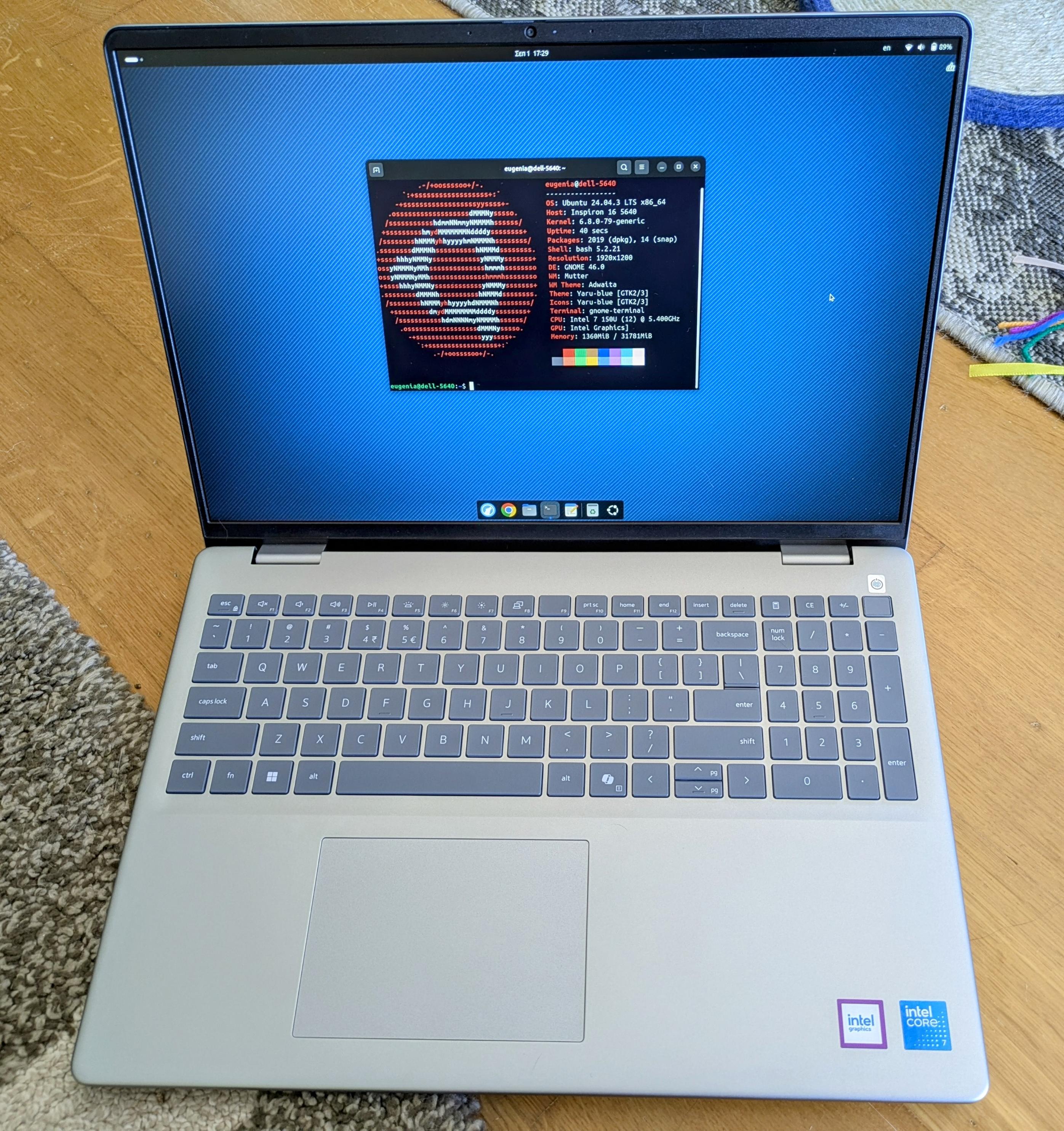
If you want a compatible laptop, you get one that has a version that comes with Linux, without major kernel changes. For example, the DELL laptops. The DELL laptops get hate, but they are tested against Linux. I personally got the 5640: https://files.mastodon.social/media_attachments/files/115/129/776/310/532/073/original/ffe65da00bfd0b39.jpg It now runs Mint and Debian-Testing.
I paid just $900 euros with 32GB of RAM, and my husband got the same with 64GB of RAM for $1000 here in Greece. Everything works 100%, except touchpad’s palm rejection (I made a bug report about it).
Are you looking for a gaming laptop with a dedicated gpu or just a newer one with a faster cpu/igpu?
A gaming laptop. My current one is fine for most everything else at this point. I don’t game super hard, but when I play my go-to game or try out something new, I wanna at least not be bouncing between 30-45 FPS.
Usually wifi cards are the biggest potential issue. If you’re buying something brand new that hasn’t been out yet for that long, your best bet is to probably use something arch-based as a distro so that you get the latest kernel versions. When i bought my ideapad years ago i tried installing void on it, but the kernel on the iso was too old and my wifi card wasn’t recognized. I had to use usb tethering on my phone to update the system. After that everything was working.
Oof, thanks for the heads up. I honestly think I have a pretty good list of components to double check at this point and it’s driving me away from anything bleeding edge. Whatever I end up getting, it’ll be something that’s new-ish right now, but I’ll be buying it a year from now.
If you wanna game Asus Zephyrus with AMD GPU (6000 series or higher) has an excellent Linux support and community support, dare I say it’s better than Framework or Systems76 in term of replacement parts if you live outside EU or US
Amazon renewed I find dell Inspiron or xps work well. Used to be Lenovo think pads but not so sure about the newer ones.
I did check out System76 and even if the price is a bit high, it would be kind of nice to support a company in the EU. That alone has a bit of appeal. I haven’t seen Framework before, though. I’ll look them up, thanks for the tip!
For an EU based company you might want to check out Tuxedo https://www.tuxedocomputers.com/index.php they are based in Germany and sell Linux compatible notebooks
Oh shoot, I’m an idiot. Tuxedo is what I was looking at. 😅 Thank you for the link!
I’m using a 10 years old Razer Blade Stealth 13 on Debian and so far no only minor problems with it.
Consequently my advice is :
- do you actually “need” a new one or do you just “want” one? if the later then could be 2nd hand
- if you do then share either what your “main game” is or what its requirements are, because e.g Slay the Spire runs on nearly anything
- do not buy something brand new unless you are ready to tinker, consider something a year old
- whatever you do, check online review specifically on Linux installations, that will let you know if something somehow (typically inconsequential, e.g. LED tweaking) requires proprietary software
- consider buying directly from a Linux pre-installed vendor, this way you are 100% sure it will work (but it’s typically not cheap)
My go-to is FFXIV, but I run it with a pretty large number of mods, which is what is hard to keep up with on my current laptop. Between that and just not being able to play any modern game, (in particular, I wanted to be able to play the new Silent Hill F), it’s definitely more of a want, but it’s a pretty strong want. 😅
My current laptop is about 6 years old, and it’s getting to the point where my frame rate during raids is dipping below 60 frames quite frequently, even with the minimum settings, which is what got me looking at upgrading.
I’ll look at Linux pre-installed vendors, though, I hadn’t thought about that. And the year old tech is a super good tip also, thanks!
try cachyos for a performance boost, it did wonders on my desktop
Fingerprint readers and touchscreens can be hit or miss for Linux support.
I think this is a list of supported readers. When you get a shortlist of devices you want to purchase, compare its fingerprint reader with this list: https://fprint.freedesktop.org/supported-devices.html
A used ThinkPad?