

1·
5 days agoso it’s kind of like the opposite of a swap file
so it’s kind of like the opposite of a swap file
thanks, that made it clearer!
thanks! but it’s unclear how to tell it lives in RAM…
Filesystem      Size  Used Avail Use% Mounted on
tmpfs           1,6G  2,2M  1,6G   1% /run
tmpfs           7,8G  1,5G  6,3G  19% /dev/shm
tmpfs           5,0M  8,0K  5,0M   1% /run/lock
tmpfs           1,0M     0  1,0M   0% /run/credentials/systemd-journald.service
tmpfs           1,0M     0  1,0M   0% /run/credentials/systemd-resolved.service
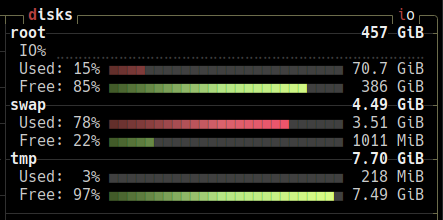
tmpfs           7,8G  236M  7,5G   3% /tmp
tmpfs           1,6G   11M  1,6G   1% /run/user/1000
it lists multiple tmpfs:
tmpfs on /run type tmpfs (rw,nosuid,nodev,noexec,relatime,size=1616504k,mode=755,inode64)
tmpfs on /dev/shm type tmpfs (rw,nosuid,nodev,inode64)
tmpfs on /run/lock type tmpfs (rw,nosuid,nodev,noexec,relatime,size=5120k,inode64)
tmpfs on /run/credentials/systemd-journald.service type tmpfs (ro,nosuid,nodev,noexec,relatime,nosymfollow,size=1024k,nr_inodes=1024,mode=700,inode64,noswap)
tmpfs on /run/credentials/systemd-resolved.service type tmpfs (ro,nosuid,nodev,noexec,relatime,nosymfollow,size=1024k,nr_inodes=1024,mode=700,inode64,noswap)
**tmpfs on /tmp type tmpfs (rw,noatime,inode64)** (i am guessing it's this one)
tmpfs on /run/user/1000 type tmpfs (rw,nosuid,nodev,relatime,size=1616500k,nr_inodes=404125,mode=700,uid=1000,gid=1000,inode64)
tmpfs on /run/snapd/ns type tmpfs (rw,nosuid,nodev,noexec,relatime,size=1616504k,mode=755,inode64)
i hope these are all as konsole doesn’t seem to have a search function in kubuntu, why?
thanks for the reply! does that mean it occupies 7.7gib of the 9.57gib RAM currently being used? or just the 218mib?

the first one is the only one i’d recommend (and its remaster)
“if it’s not fun, why bother?”