

edit: FYI, this shop is OP’s shop
Found them! This lets me cheat and figure out the ones I couldn’t name (or knew I’d got wrong like Digital Ocean that I thought probably wasn’t Commodore 64).
New account since lemmyrs.org went down, other @Deebsters are available.


edit: FYI, this shop is OP’s shop
Found them! This lets me cheat and figure out the ones I couldn’t name (or knew I’d got wrong like Digital Ocean that I thought probably wasn’t Commodore 64).


These are really consistent, do you print them yourself?


I’ve never played that either, but I love Metroidvanias so I assume it’s great.
I picked up the Mass Effect trilogy recently following a tip from here (I think).


Yeah, I hate those little dots and I inevitably jump through the hoops until I’ve clicked enough things to make them go away.
Not quite what you were asking for, but there is https://tomgroenwoldt.github.io/helix-shortcut-quiz/
It’s quite good for letting you know about things you didn’t know you could do, but sometimes it tells me I’m wrong because I’d do it a different way - e.g. I’d go to line 13 by :13 but it wants 13G.
Also, from within helix you can do space ? to get the list of commands and any bindings they’re on.
edit: also, FYI Helix and similar are modal, not modular (although there is a plugin system on the way).


I have Tasker running, and you can set it up to do this too. Between ntfy and Google’s version I think I’m covered already!


Most of the manga I have is amateur translated stuff, so the metadata quality varies with release groups.
The graphic novels are generally retail releases, but sometimes I still want to edit to get rid of marketing words (e.g. the title might mention how it’s now a Netflix series or something).


I guess I’ve just been lucky then! I’ve stripped DRM off everything else, so I expect theirs would come off using the same tools.


The latest Kindle update broke the jailbreak even if it was installed, so you’ll need to stop updates. You could just leave it in airplane mode, but not being able to use the internet to pull down books from your Calibre-web server means you may as well just send books via Calibre.
I’m planning on getting a Kobo Clara BW when my Kindle dies (it’s currently got holes at the corners and a few dodgy-sounding rattles so soon™). Then I can use Koreader+Calibre-web to download books and sync read state like you can do with Amazon.
So your process here is get comics -> comictagger -> upload to server and kavita, correct?
Pretty much, apart from that I often add them and only fix if necessary, e.g. they’re not going into series properly.


None of the books I’ve bought from kobo.com have DRM.


I went with ntfy as well - you can set the different levels to alert in different ways and my max priority is set to always ring even if the phone is on silent. Mostly I use max prio as a find-my-phone tool, but there are real alerts that would use it.


Ebooks: I use Calibre locally and Calibre-web on the server (read-only metadata db, I overwrite with the Calibre version as tagging, etc is far easier on desktop).
You can connect Koreader to Calibre-web and until maybe a fortnight ago you could jailbreak a Kindle and use Koreader instead of the default software. Now you’ll need to manually move files over, or use the email-to-Kindle option (probably a bad idea, but I expect Amazon can tell if you’ve side loaded pirated content anyway). Nowadays I buy from not-Amazon sources, strip any DRM and send it over.
Manga/comics/graphic novels: I use Kavita on the server and I use comictagger on desktop to fix the metadata.
I’m happy to use different set ups for the different types as they’re quite different experiences and specialist tools work better.


I just went to look for answers this, since report-uri.com is killing its free tier, and the lowest paid is way higher than my usage justifies. What did you settle on?
I think there’s a lot of people who would be happy with a Chromebook in computer form, and those are also the market for Linux.


100% the second one. It’s the idiomatic way to do this in Rust, and it leaves you with an immutable object.
I personally like to move the short declarations together (i.e. body down with language_id (or both at the top)) but that’s a minor quibble.

Bad wording on my part, I wasn’t disagreeing. My file server has a /files directory because it saves me a few key strokes and because I can.
Is Gobo case-insensitive by default? Typing those seems annoying.
That’s an old image, though - Windows has a C:\Users\youruser setup like /home/youruser for a while now.
I find the %APPDATA% thing way less convenient than ~/.config and I’m quite happy when programs have the “bug” that they still use ~/.config on Windows.


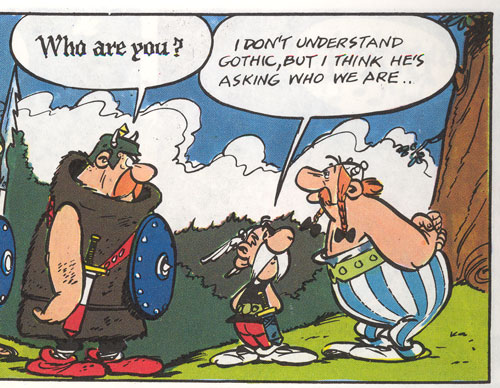
I like that idea of using the different fonts for e.g. Copilot suggestions - reminds me of reading Asterix comics as a kid when they’d use gothic black for the Goth’s speech, etc.
edit: e.g.

In the other post, you claim you’d ordered them from Etsy. Is it your Etsy shop? I’m struggling to see how both can be true.