- cross-posted to:
- selfhosted@lemmy.world
- cross-posted to:
- selfhosted@lemmy.world
How to test and safely keep using your janky RAM without compromising stability using memtest86+ and the memmap kernel param.
You must log in or register to comment.
TLDR - try slowing down “bad” ram
RAM is tricky these days. When you buy “fast” ram - in my case 6200 dominator sticks - what you really are buying is ram that the manufacturer says can be overclocked to 6200 speeds. But this is shady at best. It is entirely possible for that ram to run fine in your rig, and fail miserably in mine - showing itself as errors in memtest. This can be a result of the motherboard or say your cpu - and nothing is broken. Not the chip, not the mobo, not the ram - they just don’t work together at those speeds. Two sticks can work just fine, and then fail when you add two more (for a total of four). I’ve even had sticks that were on the edge, works for a year, and then started giving me trouble.
Most people just RMA those sticks - which I support - if it’s marketed to run at those speeds, then they should run at those speeds everywhere. But if you have “bad” memory laying around that was out of warranty, and given today’s prices - it might be worth pulling them out and trying to run them a little slower. It’s not like you have to take them all the way down to 3200 and turn off the overlock. For example, on many amd rigs, 6000 is the sweet spot. My “bad” stick of 6200 immediately fails a memtest at 6200 (even running that single dimm), but infinitely passes at 6000 (even with 4 sticks plugged in). I can’t even tell the difference between 6200 and 6000.
So ya - try slowing those bad sticks down manually. It might only be a little bit of a performance hit, but at today’s prices, could save you $1000
Lowering frequency is often the right solution and I do mention it in the writeup. I couldn’t find any up-to-date, accurate and accessible info on how to safely keep running with actually faulty DIMMs and it’s not obvious so I thought people might find working instructions helpful.
If you’re still wary of using some old 3200 stick you have and can’t or won’t RMA, please sell it to me instead of binning it :3
TLDR - try slowing down “bad” ram
Bless you. 0% chance I was going to an external blog. I don’t understand how some people still don’t understand what poor taste it is to post links to your own site rather than just creating content here.
You are telling people to break rule 4, which I find a reasonable one: “Don’t duplicate the full text of your blog or github here. Just post the link for folks to click”
It’s a static HTML page with no JS. I think telling people that’s unwelcome and that it’s all-in on your platform or GTFO is what is poor taste. Maybe one day my blog will speak native ActivityPub if I bother setting up a non-static hosting for it.
I am not going to rewrite the whole post and have it maybe render poorly in your client due to handling inconsistencies and maybe be gone in 10 years due to platform changes just so you don’t have to click. Just disable JS and image loading in your browser or read it with lynx or sth if you are concerned.
i don’t blame them; until now all social media was under a centralized control that got to own the content and got do with it as they pleased as a a result. (eg reddit).
it’s going to take a while to go back to sharing this content on social media like it used to be and that’s assuming that it will ever go back at all.
Also, check your warranty. I just found some bad ram I bought years ago and thought I was in trouble. Turns out g.skill has a lifetime warranty
Really common, actually. RAM doesn’t really wear out, so if you do get hit with some faulty DIMMS, look into RMAs.
I had some bad g.skill DDR4 last year. I assumed it was out of warranty. Thanks for the tip!
I’m thinking my G.Skill 64GB set I bought in 2025 is crashing my PC. Gonna run a MemTest86+ overnight to check. Rated for 1.45V and up to DDR4-3200 with the XMP profile- PC crashes under load just minutes into a fresh reboot.
This said, an equivalent 64GB kit of their DDR4 CL19 (F4-2666C19D-64GVK) is retailing at the store I bought my original CL14 Ripjaws for €753. I bought the CL14 faster 64GB kit (F4-3200C14D-64GVK (EOL)) for €177.45 So SHIT I don’t know how G.Skill is going to handle my situation, if MemTest86+ fails out at the 3200MHz stress test (on their official site, they declare that my possibly defective F4-3200C14D-64GVK (EOL) can reach 3200MHz with a small bump up of voltage to 1.45V, up from stock 1.2V).
How did it play out for you, with their Limited Lifetime Warranty? I’m in the EU.
I’m in the States but they were great about it. Issued an RMA and sent me new RAM. Total turnaround from me shipping bad ram to receiving new was only about a week. I haven’t tested the new RAM yet but assume it will be fine. I couldn’t ask for a much better process to be honest
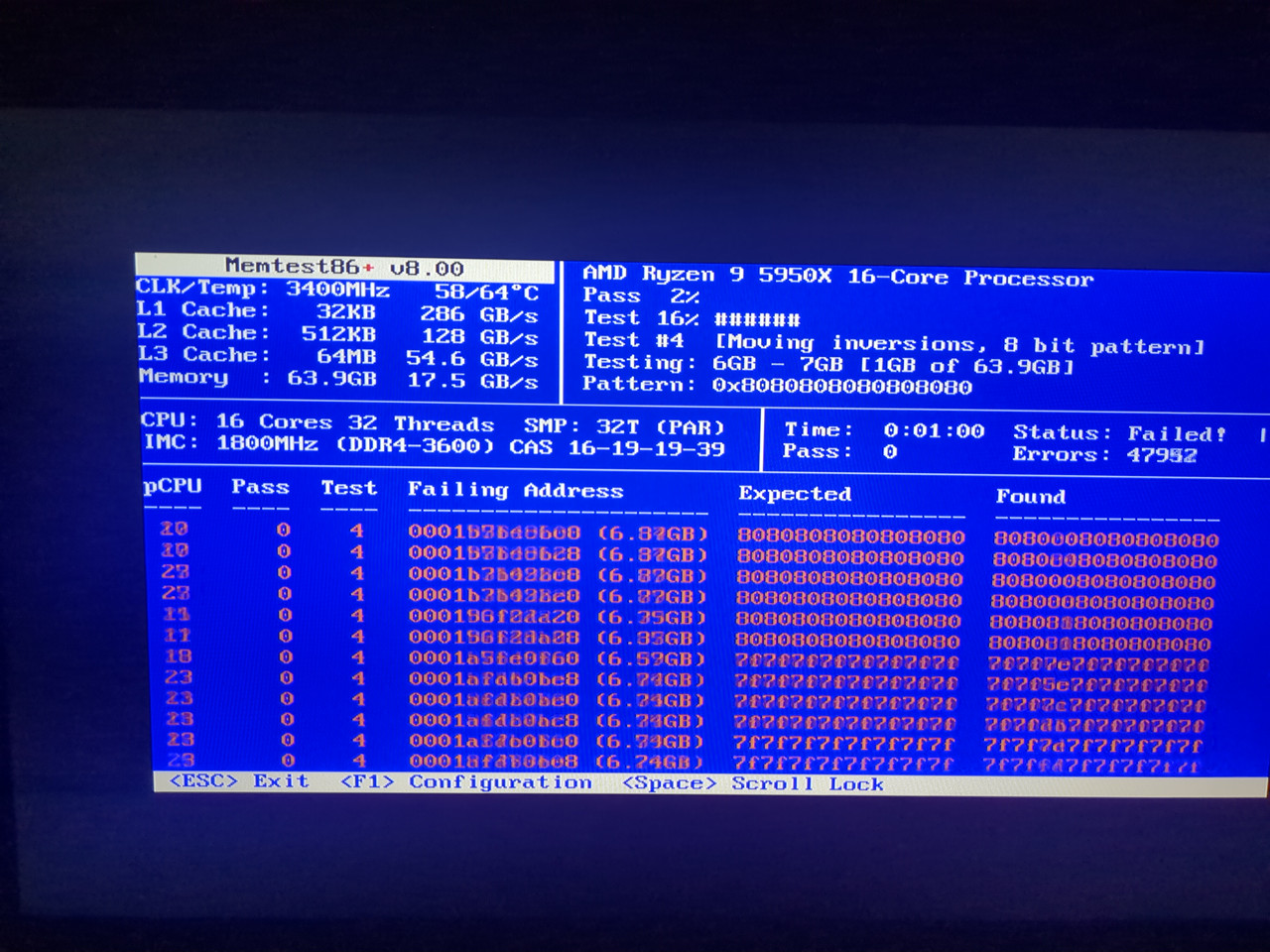
Couldn’t wait to test under MemTest86+… well, looks like they’re fucked:
My MemTest86+ results G.Skill Ripjaws 64GB
Edit: was trying 3600MHz at 1.35V, which was wrong for both values. Need it at 3200MHz at 1.45V and MemTest86+ is happy now. CAS 14-18-18-38
Thanks so much for the swift reply! Reassuring. I’ll be devastated that I’m going from CL14 3200Mhz to CL19 2666Mhz if they want to “upgrade” me. I did a lotta research when piecing my build, and the AMD 5950X has an Infinity Fabric of 1:1 at CL14 3200Mhz. I wanted the absolute best baseline, GPU-excepted. Sowing down ain’t for this build.
What state if you don’t mind me asking? I lived in FL, TX, MD, and PA before jumping The Atlantic Ocean a few years ago.
I’m over on the other side of the states in the PNW. Also running a 5950x! We’re computer twinsies
I did a huge jump from an AMD Phenom II X6 1055T CPU (6-core AM3 socket) kept in an old gen1 Thermaltake Armor case (think plastic transparent window), my 2012 build. This is my 3rd build ever, and the Thermaltake Armor had to go! I love this 5950x, it’s a beast, and I hope to get 10+ years outta this rig. You?